Account Deletion Guide for We Good Care Mobile App
We understand that users may wish to delete their accounts for various reasons. If you decide to proceed, follow the steps below:
1. Login to We Good Care Mobile App
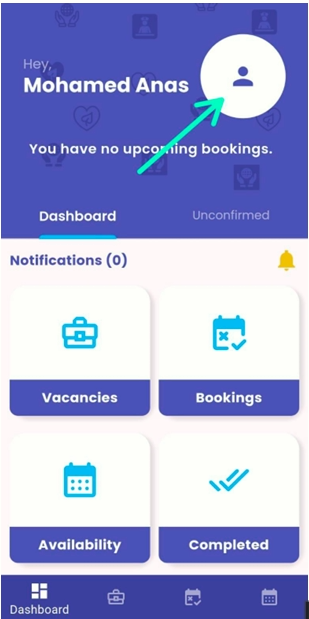
- Open the app on your device.
- Go to the Profile page.
2. Initiate Account Deletion
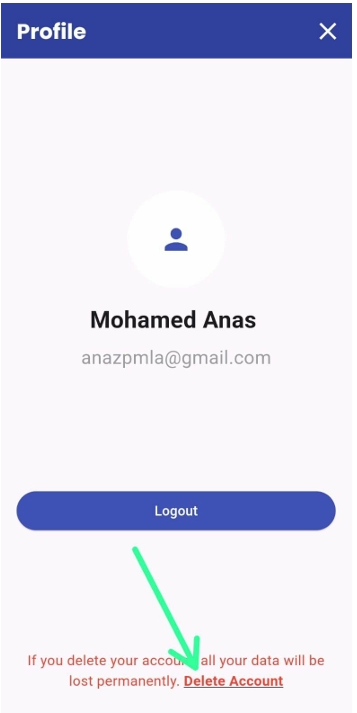
- Scroll to the bottom of the Profile page.
- Tap on the ‘Delete Account’ link.
3. Confirm Deletion
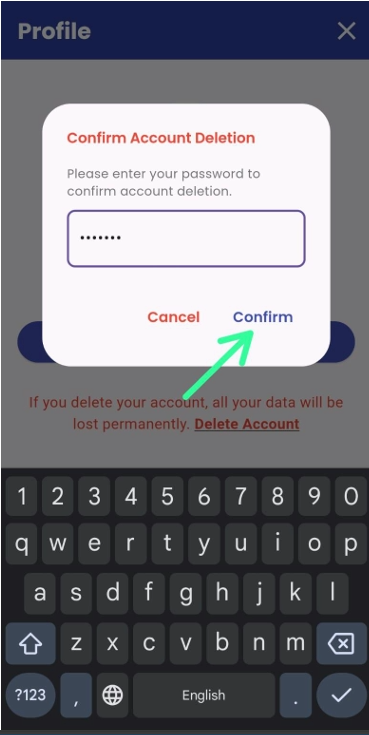
- Enter your password in the field provided.
- Tap the ‘Confirm’ button to proceed.
Important Information
- Your account and all associated data will be permanently deleted.
- Once deleted, it cannot be recovered.
- You can always create a new account later if needed.